Google Next 2026: What’s New for Looker, BigQuery, Data Platforms and Agentic Analytics
Lydia, Olivier Dupuis and I were representing Rittman Analytics at Google Next 2026 in Las Vegas this last week, and it certainly was an event at Google-scale.
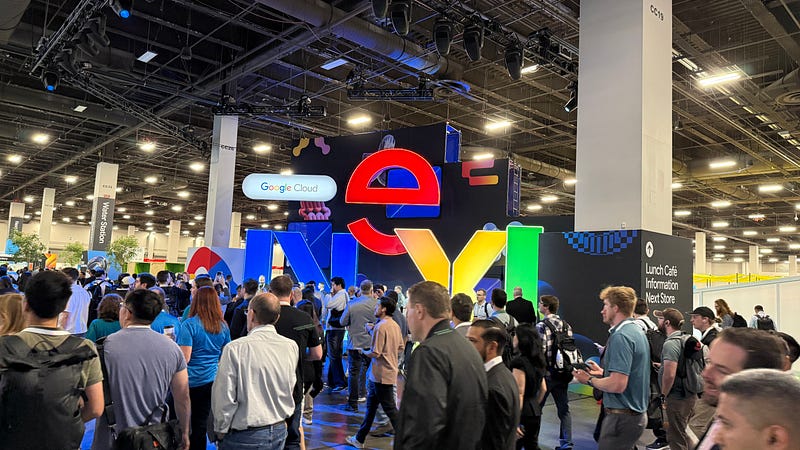
In a masterpiece of great-timing I managed to twist my ankle hiking around Zion National Park the weekend before it all started, and so therefore spent the rest of the week slowly limping-around the vast event space trying to still get to see some of the great keynotes and breakout sessions relating to Looker, data analytics, data integration and AI & agentic analytics.
This blog is actually Part 2 in a short series of Google Next 2026 updates from us, with Part 1 authored by Olivier Dupuis and titled “Google Next ’26: Agents Everywhere, Semantics Nowhere”. As you’ll see from my post I came-away with a slightly different take on the role of the semantic layer in Google’s new Agentic Data Cloud, so make sure you read Olivier’s post to for an alternative take on where LookML fits into Google Cloud’s grand strategy.
That said, the overall framing from Google this year for data analytics and data platform is a shift from a “system of intelligence” (reactive BI that answers questions when asked) to a “system of action” (proactive agents that monitor metrics, summarise findings and take action on behalf of the business).
Backing-up my theory (Olivier Dupuis) that every new thing we see announced today for the modern data stack was part of my Oracle consulting toolkit twenty years ago, Actionable intelligence (and Thomas Kurian’s enthusiasm for it) is clearly nothing new, but this re-emphasis is still doing useful work because it changes what you should be scoping when you commission a Looker delivery project in 2026.
This post picks-out the changes that will matter most to clients commissioning Looker or BigQuery work over the next twelve months, plus a few lessons from the customer sessions that were, for me, the most valuable parts of the conference.
Google’s Agentic Data Cloud
The keynote announcement was Agentic Data Cloud, Google’s answer to the problem where tools we built to help humans understand data aren’t designed for a world where AI agents act on that data autonomously, and is built-around three ideas:
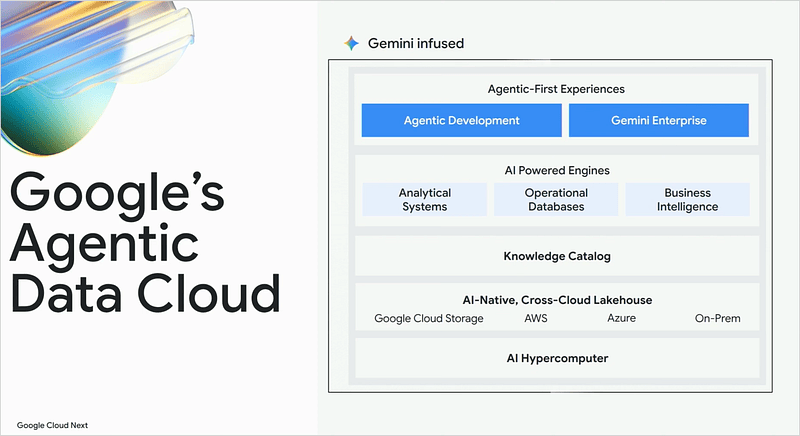
- Agents need context, not just data. Pointing a powerful AI agent at a raw data lake and expecting it to figure out your business is a recipe for expensive mistakes. Agents need to understand what your data means; that “net revenue” excludes returns, that a particular metric is calculated differently across two business units, that a specific contract clause changes how a shipment should be routed. Google’s Knowledge Catalog is designed to capture and continuously maintain this institutional knowledge, so every agent that touches your data is working from the same governed, accurate understanding of your business.
- Agents need to act, not just report. The shift Google is describing is from a “system of intelligence” which tells you what happened, to a “system of action” which does something about it. A practical example from the conference was that rather than a dashboard showing an order cancellation spike, an agent detects the spike, performs root cause analysis across logistics and sales data, identifies the distribution hub causing the problem, recommends a rerouting action, and sets up a monitoring agent to watch for when conditions improve. No human needed to ask the question.
- Your data doesn’t need to move. One of the persistent frustrations with cloud data platforms has been the expectation that you migrate everything to one place before you get value. Google’s approach allows agents to query data wherever it lives – across Google Cloud, AWS, Azure, Snowflake, Databricks, or on-premises systems – without forcing expensive and time-consuming data movement.
Looker as the Agentic Data Cloud “Experience Layer”
In practical terms, the Agentic Data Cloud is the combination of BigQuery, Google’s Knowledge Catalog, Gemini and Looker as its “Experience Layer”, working as an integrated system rather than separate tools.
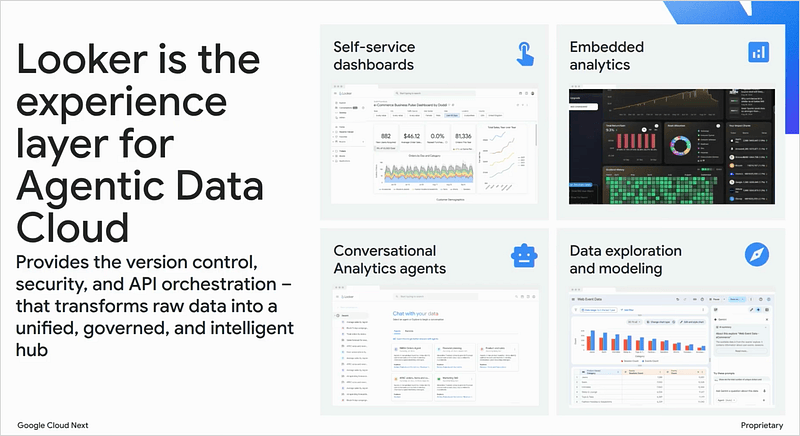
The conversational analytics, dashboard agents, triggered workflows and other Looker announcements at Google Next 2026 are the user-facing expression of this architecture, the point at which business users and analysts start to experience the difference between BI that reports and BI that acts.
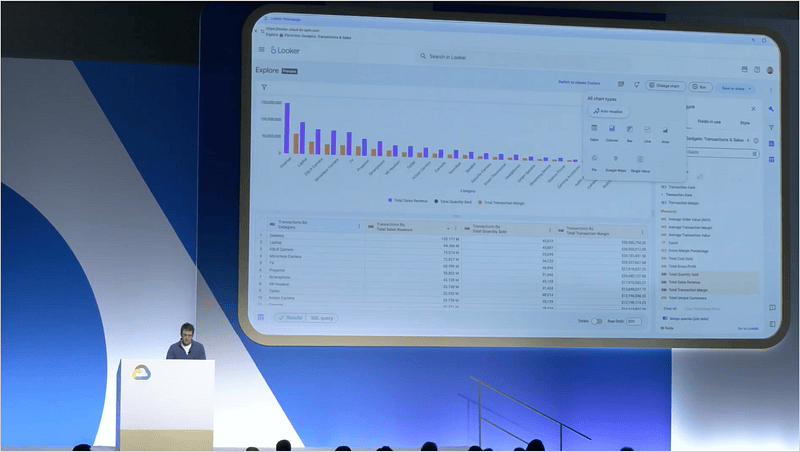
Looker’s new Explore experience pushes that further, replacing the old field-picker-and-filters paradigm with a visual-first, drag-and-drop interface that feels much-more like Google Search or Google Docs (or dare I say it, Omni). Three new Gemini assistants are now embedded directly in Explore: an insight assistant for natural-language navigation, an expression assistant that writes Looker expressions from plain English, and a visualization assistant that picks the right chart type for what you’re asking.
For those of us who build these things for a living, less of our delivery time will go on hand-holding around the explore visualization layer. More will need to go on getting LookML quality and semantic correctness right underneath, because the AI assistants are reasoning from what we’ve defined in the model. A sloppy semantic layer will produce sloppy answers at conversational scale.
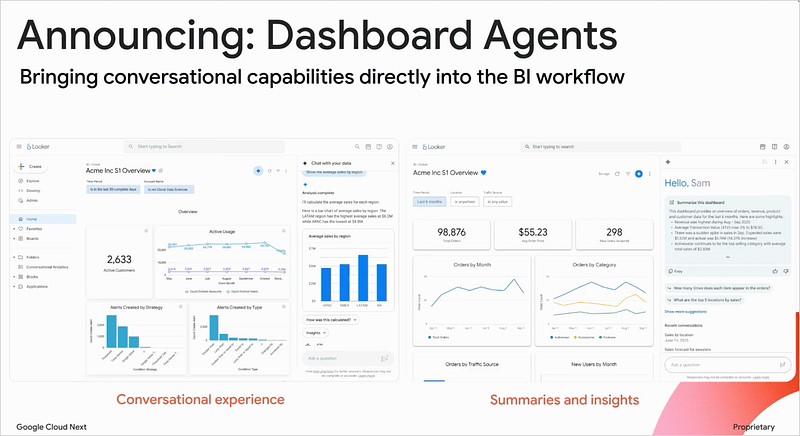
Dashboard Agents are now GA, which means dashboards are no longer the static, broadcast-only artefacts we’ve been delivering for the last decade. Users can ask a dashboard questions, get summaries of what’s on the dashboard and what’s changed, and drill into the “why” behind a number conversationally. The most compelling enterprise reference case was YouTube’s, where partner managers ask questions about creator portfolios across fifteen merged data sources, all from inside what looks like a fairly conventional Looker dashboard.
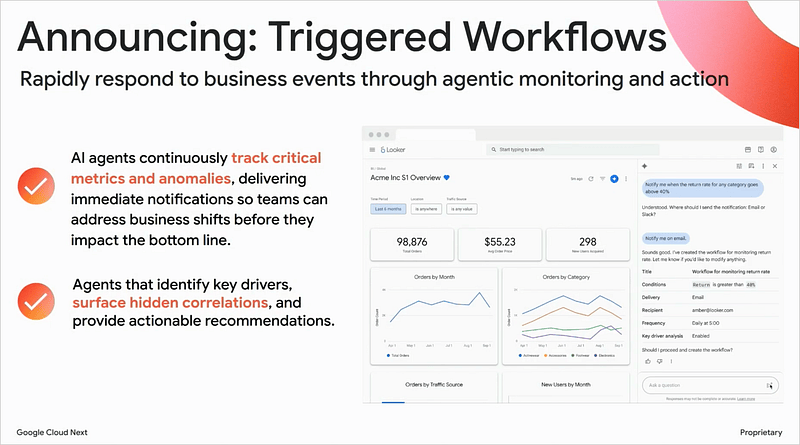
Looker Triggered Workflows go further again, moving the agents from passive responders to proactive monitors. They watch metrics continuously and alert teams when thresholds are crossed, with the near-term roadmap including agents that draft emails or post to Slack automatically. For operational analytics this is more useful than it sounds, and it’s a kind of work clients weren’t asking us for two years ago.
A few of the other Looker announcements that caught my attention were:
- Looker Agents in Gemini Enterprise: Agents built in Looker can now be published to Gemini Enterprise and managed alongside other enterprise agents. For clients investing in Gemini Enterprise, Looker stops being a standalone BI tool and becomes part of a wider AI strategy.
- Conversational Analytics API now GA: With native Looker SDK integration, iframe embed support and an open-source reference implementation, clients embedding conversational analytics into their own applications now have a supported path. I’ve had several conversations stall over the past year because the API was preview-only, and that blocker has gone.
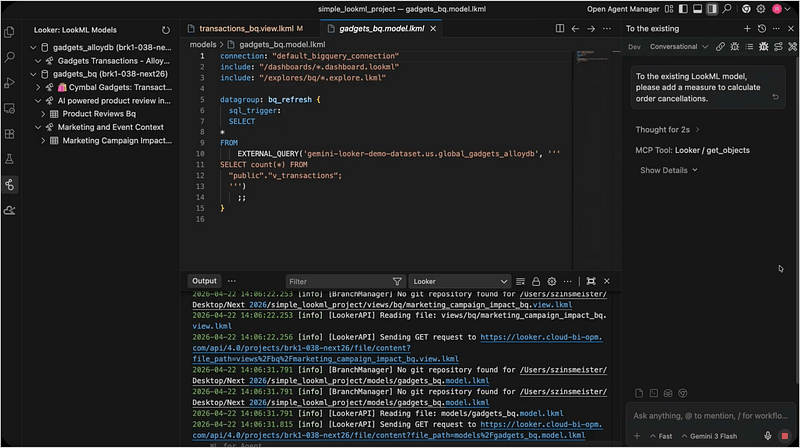
- LookML Agent for VS Code (Preview): A VS Code extension that handles the full LookML lifecycle from natural language, sitting well alongside our own Claude Code-based LookML development workflow.
- Looker MCP as an open standard: Both a managed MCP server and open-source options through MCP Toolbox. As I wrote in Claude Meets Looker, connecting Looker to AI assistants like Claude opens-up cross-explore analysis and agentic reasoning that goes well beyond what’s possible inside Looker on its own.
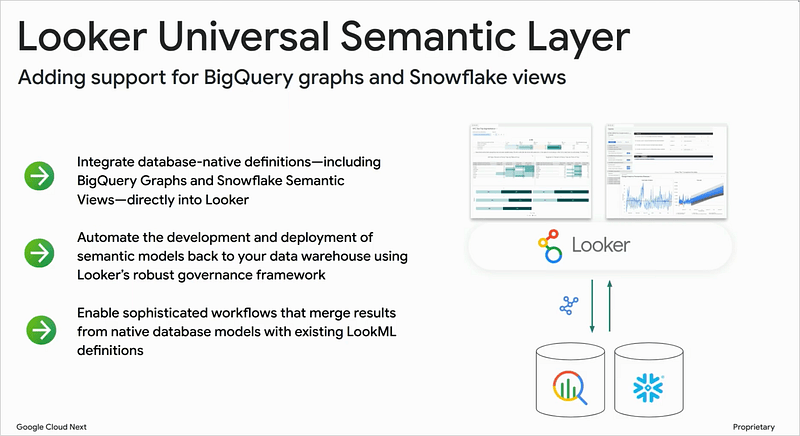
- Native semantic layer integrations: Looker now reads BigQuery graph definitions and Snowflake semantic views natively, removing friction where existing semantic logic in BigQuery previously had to be recreated in LookML.
- Multi-explore agents: Agents can now draw from up to five explores simultaneously. Yahoo’s implementation combines HR, finance, search and support data into single agents across multiple Looker instances.
Practitioner Lessons from Yahoo and Virgin Media O2
The Yahoo and Virgin Media O2 conversational-analytics sessions were the most valuable parts of the conference for those delivering this kind of work. The takeaways are worth internalising if you’re rolling-out conversational analytics in Looker over the next twelve months.
The headline learning is that golden queries and YAML-formatted agent instructions are the two biggest levers for accuracy. Yahoo’s switch from JSON to YAML in their agent instructions noticeably improved output quality, and they then moved the golden queries and business glossary into LookML rather than maintaining them separately, which significantly reduced instruction complexity because the LLM now reasons from the semantic layer rather than from hand-coded context.
Yahoo’s summary, which I think is one of the more quotable lines from the conference, was that conversational analytics doesn’t start with the AI, it instead starts with the semantic layer. Get the data and the model ready, and conversational analytics is almost the next step in the evolution.
What “good” LookML now looks like for conversational analytics has shifted accordingly. The new baseline includes labels, descriptions, synonyms and comments in every field definition, golden queries embedded directly in LookML, and a YAML-formatted business glossary in the model. Agent instructions are kept deliberately minimal because the semantic layer is doing the heavy lifting.
Dashboard Agent configuration, triggered workflow setup and golden query development should now be baseline scope items in any serious set of Looker requirements, not optional extras.
Data Studio (and the end of Studio in Looker)
Looker Studio has, I kid you not, been rebranded back to Data Studio but now has an expanded mission. It now surfaces three artefact types:
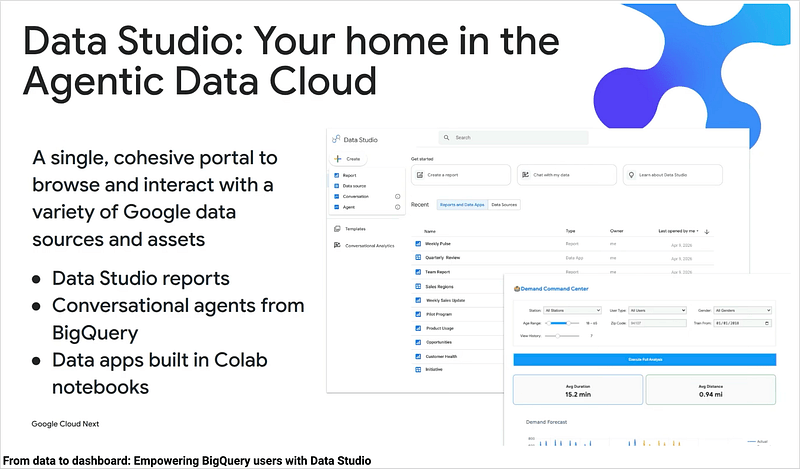
- traditional reports and dashboards (sourced from BigQuery, Google and partner SaaS connectors or from the Looker semantic layer),
- conversational analytics agents built in BigQuery and published into Data Studio,
- and a new “data apps” concept where Colab notebooks are published as interactive applications.
Data apps sit somewhere between a dashboard and a full application, and are worth understanding for clients who use Looker for operational reporting but want something more interactive without commissioning a full embedded application build.
Also worth noting that with this rebrand back to Data Studio and the new self-service explores feature, the integrated version of Looker Studio (“Studio in Looker”) that was once the future of Looker’s front-end is no longer available for organizations that haven’t already enabled it, and is due to be quietly taken-out the back and shot on June 15th, 2026.
And What About Google BigQuery?
A lot of what was previewed at last year’s Next has now moved through to GA, including the Data Engineering Agent, the Data Science Agent, Conversational Analytics in BigQuery, the Conversational Analytics API, the BigQuery ADK, the fully-managed remote BigQuery MCP Server, the open-source MCP Toolbox, and the BigQuery Agent Analytics Plugin for instrumenting agent performance telemetry.
A couple of the new announcements that will matter more than they look at first glance:
- BigQuery Fluid Scaling: BigQuery now auto-scales compute up when agents are active and back down when they aren’t, without manual sizing. The “cost of conversational analytics at scale” objection, which I’ve heard a lot from clients, weakens considerably.
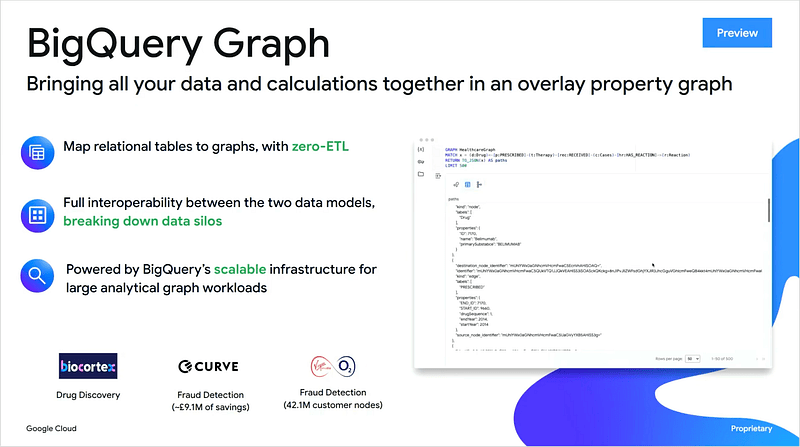
- BigQuery Graphs: Native, zero-ETL graph capability scaling to billions of nodes with ISO GQL support. The more interesting announcement is “Measures in BigQuery Graph”, which combines governed metrics with relationship mapping so agents can reason through multi-hop dependencies.
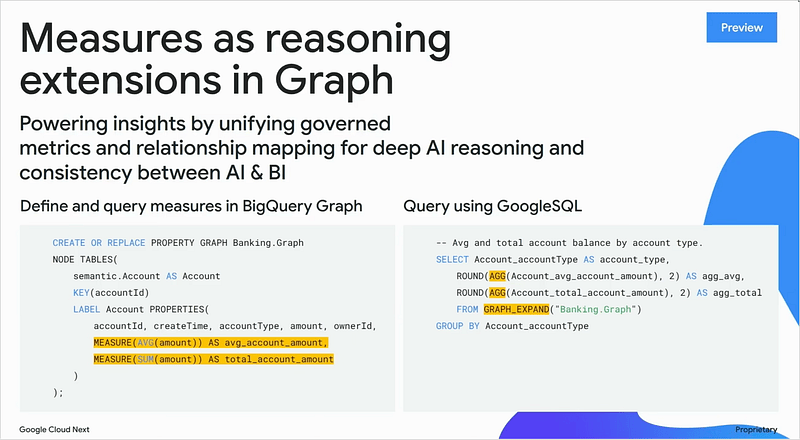
- BigQuery Measures (as “Reasoning Extensions in Graph”) : LookML measures govern calculation — defining what a metric means and ensuring consistent SQL generation across every analyst and agent using Looker. BigQuery Graph Measures govern reasoning — embedding those metric definitions into a graph of connected entities (products, suppliers, distribution hubs, routes) so agents can trace not just what a metric is but why it changed, by traversing the relationships between contributing factors.
Data Analytics Migration Services
Google’s BigQuery Migration Service has been rebranded as Data Analytics Migration Services and the upgrade is substantial. Anyone running a Snowflake-to-BigQuery, Cloudera-to-BigQuery or Databricks-to-BigQuery migration in 2026 should take a fresh look.
The new capabilities include automated assessment for Cloudera and Databricks generating a migration blueprint with workload inventory and TCO estimates, compiler-level SQL translation from Hive, Snowflake and other dialects to GoogleSQL, lakehouse migration covering Iceberg, Parquet and Hive tables, and an inline agentic validation service with table-level and column-level accuracy scores. The migration APIs are MCP-accessible, which means there’s a clear path for using Claude Code or similar agentic tooling to drive a migration end-to-end.
I’d been sceptical of the original BigQuery Migration Service for some of the more complex SQL translation work historically, but the new generation looks much better. The validation dashboard in particular replaces a lot of manual verification work that’s been dragging migration timelines for years.
Cross-Cloud Lakehouse and Federation
Google announced bi-directional read federation for Databricks Unity Catalog on AWS S3, and read federation for Snowflake Polaris and AWS Glue.
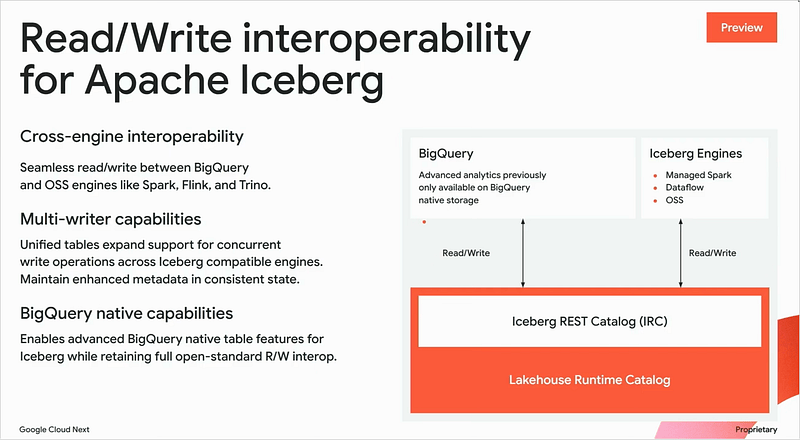
All of it is built on the Apache Iceberg REST catalog standard, which means BigQuery can now query these external catalogs directly without data movement.
For clients who can’t or won’t fully migrate, this changes the conversation. The pitch is no longer “migrate everything to BigQuery” but “keep your data where it is, query it from BigQuery, and put Looker and Conversational Analytics on top”. For organisations on Snowflake who’d otherwise be ruled-out of a GCP-first analytics practice this is a meaningful new option, and one I expect we’ll see used as a stepping-stone to fuller migrations.
Migration Practitioner Lessons from Target, Wells Fargo and Virgin Media O2
The migration panel with Target, Wells Fargo and Virgin Media O2 produced several patterns worth sharing. They reflect lessons most of us have learned the hard way over the years, but they’re worth restating.
The first and most important is to move the semantic layer first. Migrate the Looker or BI layer and give business users access to data on GCP before the underlying data engineering migration is complete, using tactical replication jobs to copy key datasets to BigQuery in the meantime. Virgin Media O2 has done this successfully across six large platform migrations and Wells Fargo endorsed the same pattern.
A few other patterns worth holding onto:
- Reduce footprint before you migrate. AI can identify unused and duplicate data before migration, shrinking what needs to move; one enterprise on the panel reported that more than 80% of their data was duplicated.
- Lift-and-shift, then modernise. Refactoring mid-migration prolongs timelines unpredictably, so get to the new platform first and modernise there.
- Embed governance from day one. Data contracts, business glossary and data quality rules should be established as part of the migration programme, not retrofitted afterwards when the political moment to do them properly has often passed.
- Start small on data contracts. Identify a bounded area, make the supplier and consumer contracts neat for that use-case, and use it as the example of what good looks like before scaling.
The “irrational goals” framing from Target was also worth borrowing. Define goals that are unachievable unless you rebuild with AI-native approaches, on the grounds that this changes the conversation from “how do we migrate” to “how do we transform”.
Google Cloud Data Agent Kit
Announced in preview, the Data Agent Kit is a VS Code extension and set of plugins for Gemini CLI, Cloud Code and Codex that packages skills and MCP tools for BigQuery data workflows. It includes agentic skills, MCP servers and tools for BigQuery access, and deep plugins for VS Code customisation, with the skills themselves open-source and customisable.
For consultancies and client teams such as ourselves already building internal agentic delivery tooling, the Data Agent Kit is worth a serious evaluation. My early take is that it handles BigQuery-layer engineering work and is complementary to broader delivery orchestration and LookML, lining up well with the Claude Skills approach we’ve been using internally.
Knowledge Catalog (formerly Dataplex)
Dataplex has been rebranded as Knowledge Catalog and repositioned as the context backend for Google Cloud agentic workflows.
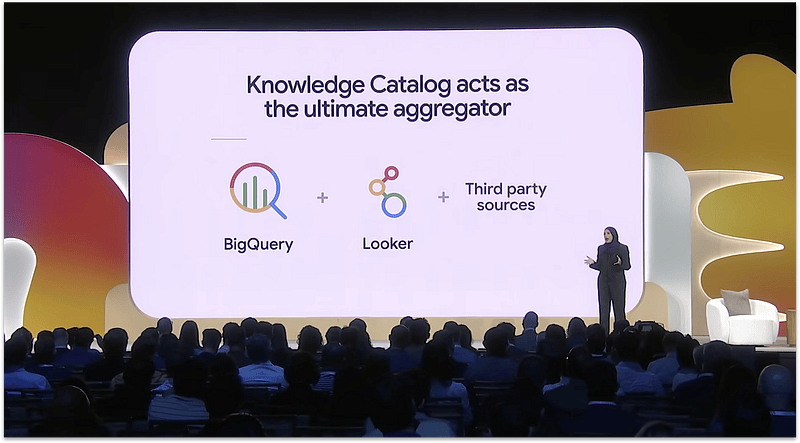
It has three pillars: aggregation of metadata across Google services including Looker, partner catalogs (Atlan, Collibra, SAP and others), enrichment with automated metadata generation and a business glossary now GA and semantic search with a Context API for agents.
The most practically instructive reference case was Bloomberg Media’s. Their “Knowledge Gap Agent” learns from agent failures, identifies where data context is wrong or incomplete, and proposes updates to Knowledge Catalog for human certification. The headline result was 102 usage notes auto-generated across twenty MVP tables, improving data access agent SQL accuracy by 63%.
For most of our smaller engagements Knowledge Catalog will remain background context. For any client building conversational analytics agents at scale where institutional knowledge isn’t yet codified anywhere the agent can reach, it’s the missing piece, and Bloomberg framed this as the “42-dollar problem” : a category of failure that affects both human analysts and AI agents equally: the missing institutional knowledge that isn’t documented anywhere in the data platform.
In Bloomberg’s example, a junior analyst correctly identified the right tables, wrote syntactically valid SQL, and applied standard net revenue logic but got the wrong answer because Bloomberg’s payments vendor charges a $42 fee for each customer dispute filed, which needs to be added to the revenue calculation. That rule isn’t in the schema, isn’t in the data pipeline, and wasn’t in any accessible documentation; instead it lived in a Confluence page from 2017 whose author had left the company.
Olivier Dupuis argues in his Google Next 2026 blog that while Google is going all-in on the agent layer, its underlying semantic and business context is relatively weak. He suggests the Knowledge Catalog feels more like a metadata aggregator than a true enterprise operating system like OpenAI’s Frontier or Palantir’s Foundry. Without a strong semantic engine linking business meaning to agents, even advanced tooling risks producing outputs that drift, hallucinate, or correctly answer the wrong question.
I agree with most of that diagnosis and with his opinion that the semantic layer matters, and it matters more in an agentic world than it ever did in a dashboarding one. Where I’d take a slightly more optimistic view is that the LookML semantic layer, as I noted in my Conversational Analytics piece, already does most of what an Enterprise Operating System would need a business-context layer to do, eliminating the “multiple versions of the truth” problem, providing governed metric definitions, and serving as the trusted-metrics-store for AI assistants like Claude through MCP Toolbox.
Knowledge Catalog being relatively quiet on the LookML integration front at this conference doesn’t mean LookML isn’t doing the work. It just means the work is being done one layer down from where Olivier is looking for it.
The more concrete point is around what’s documented in Google’s Best practices for configuring Conversational Analytics in Looker. Conversational Analytics uses two primary inputs: the structure, fields, labels, descriptions and synonyms in your LookML model, and distinct field values sampled from your data, with cardinality (i.e. the number of unique values) influencing how those values are used.
To pull those distinct values, Conversational Analytics uses the long-standing Looker API model_fieldname_suggestions method. This is the same mechanism that’s been powering filter suggestions in the field-picker and dashboard filters for as long as I’ve been working with Looker, now repurposed as a grounding signal for the LLM. Existing LookML parameters such as suggestions, suggest_explore and suggest_dimension become the developer’s way of actively shaping what values Conversational Analytics knows about.
This pattern is one I’ve been hand-rolling for a while on my own BigQuery data warehouse. Alongside the standard INFORMATION_SCHEMA-derived data dictionary, I maintain a markdown guide, exposed to Claude as a Skill and regenerated periodically by a profiling step, that describes each table with its row counts, date ranges and the value sets and cardinalities of the high-signal categorical fields. So Claude knows, for example, that my messages_fact table splits across iMessage (36K), Slack (17K), WhatsApp (1.1K) and so on, rather than having to guess.
Conversational Analytics is now doing the same thing at the LookML layer, generalised across all Looker users rather than handcrafted for one dataset. To put that into LookML terms, if I had a city dimension populated from customer or operational data, Conversational Analytics would sample its distinct values, see “Brighton”, “Hove”, “London” and so on, and use cardinality to weight which values are likely to come up in user questions.
The places to intervene as a LookML developer are with the suggestions, suggest_explore and suggest_dimension parameters, which look like this:
view: customer {
  dimension: city {
    label: "Customer City"
    description: "The city associated with the customer's primary address. Most operational activity occurs in Brighton and Hove (UK head office) and London (UK secondary office)."
    type: string
    sql: ${TABLE}.customer_city ;;
    # Hard-code a curated list of values rather than letting Looker
    # run SELECT DISTINCT against a large table.
    suggestions: ["Brighton", "Hove", "London", "Edinburgh", "Manchester"]
  }
  dimension: customer_segment {
    label: "Customer Segment"
    description: "Customer tier based on annual recurring revenue."
    type: string
    sql: ${TABLE}.segment ;;
    # Pull suggestions from another view rather than scanning
    # the much larger customer fact table.
    suggest_explore: segments
    suggest_dimension: segments.segment_name
  }
}
Combine those parameters with descriptions, synonyms and a few golden queries embedded in the model, and you’ve got a LookML semantic layer doing exactly what Olivier is arguing the Enterprise Operating System needs to do. It provides grounded, governed business context to the agent layer, with cardinality-aware sampling of real values from your data, all driven from the same LookML powering your dashboards and explores.
So my read on Knowledge Catalog versus LookML is a bit different. Today, LookML appears as just one input among many in the Knowledge Catalog architecture, and I can understand why that looks thin. I’d expect it to evolve significantly over the next twelve to eighteen months, as Google has every reason to make LookML the most prominent input into Knowledge Catalog rather than just one of several.
The semantic engine that Olivier is rightly arguing the Enterprise Operating System needs isn’t quite missing. It’s mostly in LookML, and the open question is whether Knowledge Catalog grows-up to be the unifying business-context layer that surfaces LookML semantics across the whole agentic stack, or whether something else does. Either way, the bet on getting your LookML right is the bet most likely to age well.
Where I do agree with Olivier without reservation is on the ontology question. None of what’s currently in LookML or Knowledge Catalog amounts to the kind of organisation-wide ontology that Palantir’s Foundry has been building for a decade or that OpenAI’s Frontier is now claiming to build, and that’s a genuine gap in the Google story Cloud Next ’27 will need to have a better answer to. But on the practitioner level, the work we’re doing today on LookML quality is the same work the Enterprise Operating System will eventually need to consume, whatever form it takes.
What This Means for Looker and BigQuery Work in 2026
My most important takeaway from Next 2026 is, therefore, that the semantic layer is now the foundation for everything else in your Looker and BigQuery stack, including the work that’s nominally about AI rather than BI. If your LookML is right, the agents work, the conversational analytics gives sensible answers, and the dashboards’ agentic features add value rather than confusion. If it isn’t right, no amount of prompt engineering will fix it.
The second takeaway is that the baseline definition of a Looker implementation has shifted. Dashboard Agents, triggered workflows, Conversational Analytics readiness and golden query development are now scope items rather than optional extras. If you’ve got a 2024-vintage scoping document you’re using to commission new work, it’s almost certainly going to under-deliver against what your business users will expect.
The third is that cross-cloud federation and migration tooling has matured to the point where the architectural conversation with Snowflake-resident or on-prem-resident clients is different to where it was a year ago. Full migration is no longer the only option, and read federation across catalogs with Looker and Conversational Analytics on top is now a credible halfway house. For some clients it’s a better answer than a full migration project would ever be.
Interested? Find Out More
Rittman Analytics is a boutique data analytics consultancy that helps ambitious, digital-native businesses scale-up their approach to data, analytics and generative AI.
We’re authorised delivery partners for Google Cloud along with Oracle, Segment, Cube, Dagster, Preset, dbt Labs and Fivetran and are experts at helping you design an analytics solution that’s right for your organisation’s needs, use-cases and budget and working with you and your data team to successfully implement it.
If you’re looking for some help and assistance with your AI initiative or would just like to talk shop and share ideas and thoughts on what’s going on in your organisation and the wider data analytics world, contact us now to organise a 100%-free, no-obligation call. We’d love to hear from you!