Introducing the Wire Framework: The “Secret Sauce” Behind Our AI-Augmented Analytics Project…
If you’ve tried asking Claude or ChatGPT to generate a dbt model or a fact table definition for you, it’s impressive how fast it can produce syntactically-correct code. But building a production data platform is more complicated than that as it’s a co-ordinated engineering effort where everything has to join and connect-up from start through to finish.
We were early adopters of LLMs and agentic coding tools such as Claude Code and Gemini CLI and the pattern we kept running into was what I’d call context drift. Each prompt is a fresh context window, and the model that generated your staging layer has no memory of the naming pattern it used when it then goes on-to build your warehouse layer; similarly, the LookML it writes references columns that it assumes exist in the dbt models it created earlier (but don’t), and the dashboard designs came-out of who knows where and bear no relation to the ones the client signed-off in the design phase.
So we built the Wire Framework, originally developed around Claude Code by Olivier Dupuis and then extended and ported to Gemini Code Assist by myself. The best way to think about it is as an exoskeleton for analytics consultants: the human still makes every design decision and approval, but the mechanical work of translating those decisions into consistent, tested, documented code happens at machine speed.
It’s become the agentic delivery engine behind our AI-augmented delivery approach and you can get a sense of the impact it’s having already with this review on LinkedIn from Power Digital’s Scott Zakrajsek, and our recent customer case study from Barton Peveril College in the UK.
The Problem : Manual delivery works, but doesn’t scale
A senior analytics engineer building a data platform manually follows a mental checklist refined over years of practice. They know that staging models should be named stg_<source>__<entity>. They know every primary key needs a not_null and unique test. They know that fact tables should reference dimension surrogate keys, not natural keys from staging. They know the client’s SOW deliverable D3 maps to three specific warehouse models.
This works. It produces high-quality platforms. But it takes 15–20 hours of focused engineering time per project phase, and the methodology lives in the engineer’s head. When they leave the project, the conventions go with them. When a junior engineer takes over, they reinvent patterns — or worse, introduce inconsistencies that surface as bugs months later.
Naive LLM generation is fast, but fragile
Asking an LLM to “generate dbt models for our Salesforce and Stripe data” produces code quickly. But without persistent context across prompts, the output suffers from predictable failures:
- Naming: Staging models named
salesforce_accountsin one prompt,stg_sf_accountin another - Test coverage: Primary key tests present on some models, missing on others. Foreign key relationship tests absent entirely
- Requirements traceability: No connection between the dashboard tile and the SOW deliverable it implements
- Documentation: Column descriptions present on the first model generated, absent by the tenth
- Convention drift:
customer_idin one model,cust_idin another,account_pkin a third
The interesting thing is, these aren’t really knowledge failures — the LLM knows dbt conventions perfectly well if you ask it directly. They’re context failures. No single prompt can carry the full context of a multi-model, multi-phase data platform.
The insight: encode the methodology, not just the prompts
The thing is, the conventions and phase discipline that make manual delivery reliable aren’t really tacit knowledge — they’re documentable rules. A staging model naming pattern is a template. A test coverage requirement is a checklist. A phase gate is a prerequisite check. A review approval is a state transition.
The Wire Framework encodes all of these as executable markdown specifications; documents detailed enough that an LLM can read them and follow them step by step, producing output that’s consistent, tested, traceable and reviewable.
- Naming consistency : For manually-written code, it depends on the developer, and for naive LLM-generated code, it drifts across prompts. With the Wire Framework, it’s enforced by templates.
- Test coverage : Manually-written code, it’s often incomplete. Naive LLM-generated code, it’s inconsistent. With the Wire Framework, it’s mandatory (every PK, every FK).
- Requirements traceability : Manually-written, it’s informal. Naive LLM: none. Wire: every model maps to requirements.
- Documentation : Manual: written after-the-fact. Naive LLM: degrades over session. Wire: generated alongside code.
- Knowledge retention — Manual: lost with staff turnover. Naive LLM: not applicable. Wire: encoded in version-controlled specs.
- Timeline per phase — Manual: 15–20 hours. Naive LLM: minutes (but requires rework). Wire: minutes of generation + 2–3 hours review.
Architecture
The framework is built on a strict separation between two components with different lifecycles — the filesystem structure below is for the Claude Code Plugin version of the framework.
wire-plugin/                     ← Component 1: Plugin (stateless, replaceable)
└── commands/dp/                 ← Self-contained command specifications (60 .md files)
    ├── start.md                 ← Entry point - shows projects, suggests next action
    ├── new.md                   ← Delivery process definitions + project creation
    ├── status.md                ← Project status reporting
    ├── requirements/
    │   ├── generate.md          ← Full workflow spec inline (200+ lines)
    │   ├── validate.md
    │   └── review.md
    ├── dbt/
    │   ├── generate.md          ← Full workflow spec inline (1,567 lines)
    │   ├── validate.md
    │   └── review.md
    ├── utils/
    │   ├── atlassian-search.md
    │   ├── jira-create.md
    │   └── meeting-context.md
    └── ...                      ← 18 artifact directories, each with generate/validate/review

Your Repository/
└── .wire/                   ← Component 2: Project Data (persistent, per-project)
    └── 20260210_meridian_saas/
        ├── status.md            ← Source of truth (YAML frontmatter state machine)
        ├── execution_log.md     ← Append-only audit trail of every command run
        ├── artifacts/           ← SOW, meeting notes, SQL examples
        ├── requirements/        ← Generated requirements spec
        ├── design/              ← Conceptual model, data model, pipeline design
        └── ...
The Gemini CLI extension follows the same structure, with .toml files instead of .md and a gemini-extension.json manifest that also declares MCP server connections.
- Component 1 (Plugin) contains our specific delivery methodology encoded as workflow specification, template, convention, and validation rule in the form of self-contained command files. When a consultant selects a project type (
full_platform,pipeline_only,dbt_development,dashboard_extension,dashboard_first,enablement) the framework knows exactly which artifacts to produce, in what order, and which gates each one must pass through. In Claude Code, commands are namespaced as/wire:dp:<command>while the Gemini CLI extension uses .toml files and/dp <command>. - Component 2 (Project Data) is everything specific to a client engagement – the SOW, the generated artifacts, and most importantly the
status.mdfile that tracks lifecycle state. When a consultant runs/wire:dp:newand selects a project type, the framework instantiates the corresponding process definition intostatus.md– writing the in-scope artifacts and their gate states as YAML frontmatter. From that point on,status.mdis the running instance of the delivery process: it records which artifacts have been generated, which have passed validation, and which have been approved by stakeholders. This lives in the client’s repository under .wire/, is never touched by upgrades, and is shared across runtimes.
What this means in practice is we can upgrade the framework mid-engagement without affecting project data. Update the plugin and all command logic is replaced instantly, but the project state stays exactly where it was.
Self-contained command architecture
When a consultant types /wire:dp:dbt:generate 20260210_meridian_saas, Claude Code loads the command’s .md file and reads its complete workflow specification: 1,567 lines covering prerequisites, upstream artifact reading, template application, SQL generation, test configuration, and status updates, and then executes it step by step.
Each command file is both the discoverable entry point and the full executable specification. The .md file is pure markdown and the workflow specification itself:
# Generate dbt models

## User Input (<project-folder>)
$ARGUMENTS

## Workflow Specification
---
description: Generate dbt models following layered architecture
---

# dbt Generate Command

## Prerequisites
[Checks status.md for approved data model...]

## Step 1: Read Data Model Specification
[Reads upstream artifacts...]

## Step 2: Generate Staging Models
[Templates, naming conventions, CTE patterns...]

## Step 3: Generate Warehouse Models
[Dimension and fact table patterns...]

...1,567 lines of complete workflow logic...
In the Gemini CLI extension, the same workflow specification is wrapped in a .tomlfile that provides a description field and embeds the markdown in a prompt field.
Modifying a command’s behaviour requires editing one file. There are no vector databases, no fine-tuned models, no RAG pipelines. Just markdown files, version-controlled in our internal plugin repository that propagate to every consultant on the next update.
Core Innovations
The Chain of Derivation
The framework enforces a strict dependency chain where each artifact constrains the next:

Each arrow represents a constraint transfer. When /wire:dp:data_model:generate runs, it reads the approved conceptual model and pipeline design including the entity names, relationship cardinalities, source table mappings and replication architecture are all determined. The data model spec adds column-level detail (names, types, tests, grain) but cannot invent new entities or ignore upstream decisions.
The dashboard_first project type follows an alternative chain where interactive dashboard mocks produce a visualization catalog that drives the data model directlym where the measures and dimensions the dashboards need determine what the warehouse must provide. Seed data enables dbt to run immediately, and a later data refactor step transitions from seeds to real client data. The constraint transfer principle is the same; only the source of the constraints changes.
By the time /wire:dp:dbt:generate runs, every model name, every column name, every join path and every test is already specified in the data model. The AI’s job at this point is translation, turning the specification into SQL and not deciding what to build.
This progressive narrowing of what the AI can choose to do is really the key to the whole thing. Each upstream artifact constrains the next, so by the time you get to code generation, there’s very little room for the kind of drift you’d normally see across LLM prompts.
Three-Gate Lifecycle
Every artifact passes through three gates:
- Generate : The AI produces the artifact by reading upstream inputs, applying templates, and following conventions from the workflow spec.
- Validate : Automated checks run against the generated output. Validation is severity-rated: critical failures block progression, important issues produce warnings and info items are suggestions. Example checks for dbt validation include naming convention compliance, test coverage verification, CTE structure validation and documentation completeness.
- Review : A human stakeholder (the consultant, the client, or a technical lead) approves the artifact. Before presenting the artifact, the framework optionally retrieves context from Fathom meeting transcripts and Confluence documents, surfacing decisions and concerns from recent meetings. The reviewer can approve, request changes (with specific feedback recorded), or flag the artifact for workshop discussion.
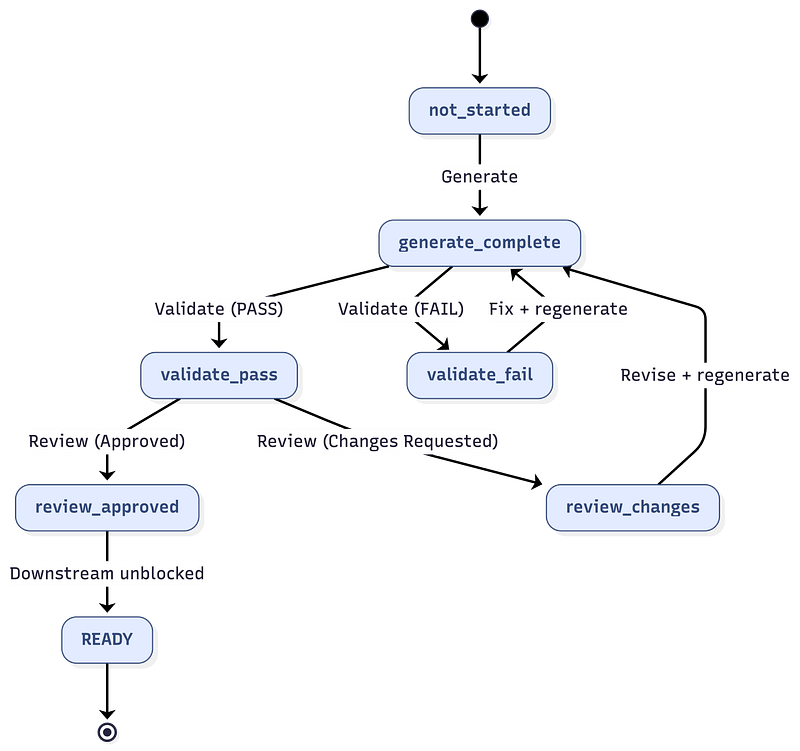
An artifact cannot, without manual override, progress downstream until all three gates are passed. The framework enforces this by having each generate command check status.md for prerequisite states:
/wire:dp:dbt:generate reads status.md and checks:
  data_model.generate == complete    ✓
  data_model.validate == pass        ✓
  data_model.review   == approved    ✓

All prerequisites met → proceed with generation.
If any prerequisite is missing, the command stops and tells the consultant exactly what to run next. Phase discipline is enforced by the AI reading project state, not by any external orchestration layer.
Convention-First Code Generation
The framework uses a two-tier convention system:
- Project-specific conventions (highest priority): If a
.dbt-conventions.mdordbt_coding_conventions.mdfile exists in the repository root, the framework uses it. This allows per-client customisation without modifying the framework. - Embedded conventions (fallback): The workflow specs contain comprehensive default conventions covering naming, SQL style, test coverage, documentation, and materialisation.
Key conventions enforced across all projects include:
- Staging models:
stg_<source>__<entity>(e.g.stg_stripe__subscription) - Dimension tables:
<entity>_dim(e.g.customer_dim - Fact tables:
<entity>_fct(e.g.revenue_fct) - Primary keys:
<object>_pk(e.g.customer_pk) - Foreign keys:
<referenced>_fk(e.g.customer_fk) - Timestamps:
<event>_ts(e.g.created_ts) - Booleans:
is_<state>/has_<thing>(e.g.is_churned,has_subscription) - CTE pattern:
s_prefix for source refs (e.g.s_stripe_subscriptions) - Final CTE: Mandatory
select * from final - Test coverage: PK gets
not_null+ unique, FK gets relationships — every model, no exceptions
These are not suggestions — the validation gate checks compliance before human review.
The Status File as State Machine
Each project’s status.md file serves dual purposes. Its YAML frontmatter is a machine-readable state machine that the framework reads and writes on every command. Its markdown body is a human-readable project dashboard.
# Machine-readable state (YAML frontmatter)
artifacts:
  requirements:
    generate: complete
    validate: pass
    review: approved
    generated_files: ["requirements/requirements_specification.md"]
    revision_history:
      - date: "2026-02-10"
        action: "generate"
        files: ["requirements/requirements_specification.md"]
      - date: "2026-02-10"
        action: "review"
        result: "approved"
        reviewer: "Sarah Chen, VP Product"
The revision_history provides a complete audit trail — who approved what, when, and with what feedback. When a reviewer requests changes and the artifact is regenerated, the history shows the full path to approval including all intermediate feedback.
There’s also defensive compatibility built in — workflow specs check for fields before using them, so a status.md created by an older framework version still works fine with newer specs. Missing fields are just treated as absent features, not errors.
Complementing the structured YAML state machine, each project maintains an execution_log.md — an append-only chronological log of every command that changes state. Each entry records a timestamp, the command invoked, its result, and a one-line summary. This provides a human-scannable narrative of the delivery process that is useful for consultant handovers, stakeholder auditing, and debugging failed commands.
Optional Integrations via MCP
The plugin pre-configures three Model Context Protocol (MCP) server connections that are available automatically to our consultants. In Claude Code, these are configured via the plugin manifest. In the Gemini CLI extension, they are declared in gemini-extension.json.
The Atlassian (Jira + Confluence) Remote MCP Server provides full project tracking. /wire:dp:new optionally creates a Jira hierarchy with one Epic per project, one Task per artifact, Sub-tasks for each lifecycle step (generate, validate, review). Every subsequent command syncs status to Jira and posts enriched comments showing file lists, revision numbers, and reviewer feedback. For example, after a data model review with changes requested:
**Data Model Design - Changes Requested**

**Reviewer**: James Park, Lead Data Engineer
**Date**: 2026-02-13
**Revision**: 2

**Feedback:**
> Need to add a product_plan_dim to track plan tier changes over time.
> The current_plan field on customer_dim won't capture historical plan transitions.

**Previous reviews:**
- 2026-02-12: Changes requested by James Park - "Missing subscription
  cancellation reason tracking"
- 2026-02-13: Changes requested by James Park

**Action**: Address feedback, revise artifact, re-validate, and re-submit.
Confluence is also searched during reviews — the framework queries for design documents, meeting notes, and technical specifications related to the artifact under review.
Our self-hosted Fathom MCP Server on GCP Cloud Run provides meeting intelligence. Before every review command presents an artifact for approval, the framework searches Fathom for recent meeting transcripts mentioning the client and artifact type. It extracts and surfaces:
- Key decisions made in previous meetings
- Outstanding concerns raised by stakeholders
- Open action items that may affect the artifact
- Feedback themes recurring across multiple meetings
This means the reviewer sees relevant meeting context before they make their approval decision, without anyone having to manually search through transcripts.
Finally (for now), the Context7 MCP Server provides up-to-date library documentation for development commands. When generating dbt models or LookML, the framework can query current documentation for packages like dbt-utils, avoiding hallucinated function signatures or deprecated syntax.
Walkthrough: A SaaS Customer Analytics Platform
To show how this all works in practice, let’s walk through two stages in a complete engagement for Meridian SaaS, a B2B SaaS company that sells project management software to mid-market teams. They want to build a customer health scoring platform that combines data from three sources:
- Salesforce (CRM): Accounts, opportunities, support cases
- Stripe (Billing): Subscriptions, invoices, payment events
- Product database (PostgreSQL): Feature usage events, login activity, workspace metrics
The goal is to create a Looker dashboard showing customer health scores that combine product engagement, payment health, and support burden into a single composite metric, enabling their customer success team to prioritise outreach to at-risk accounts.
Project Setup & Design Phase
The diagram below shows the design phase of the process flow for the full_platform engagement required to meet the client’s needs. Each artifact passes through its gates (generate, validate, review) as described above and dashed arrows indicate iteration when a reviewer requests changes or validation fails, with the artifact returns to the generate step to cycle through the gates again. Solid arrows show the forward path when an artifact is approved.
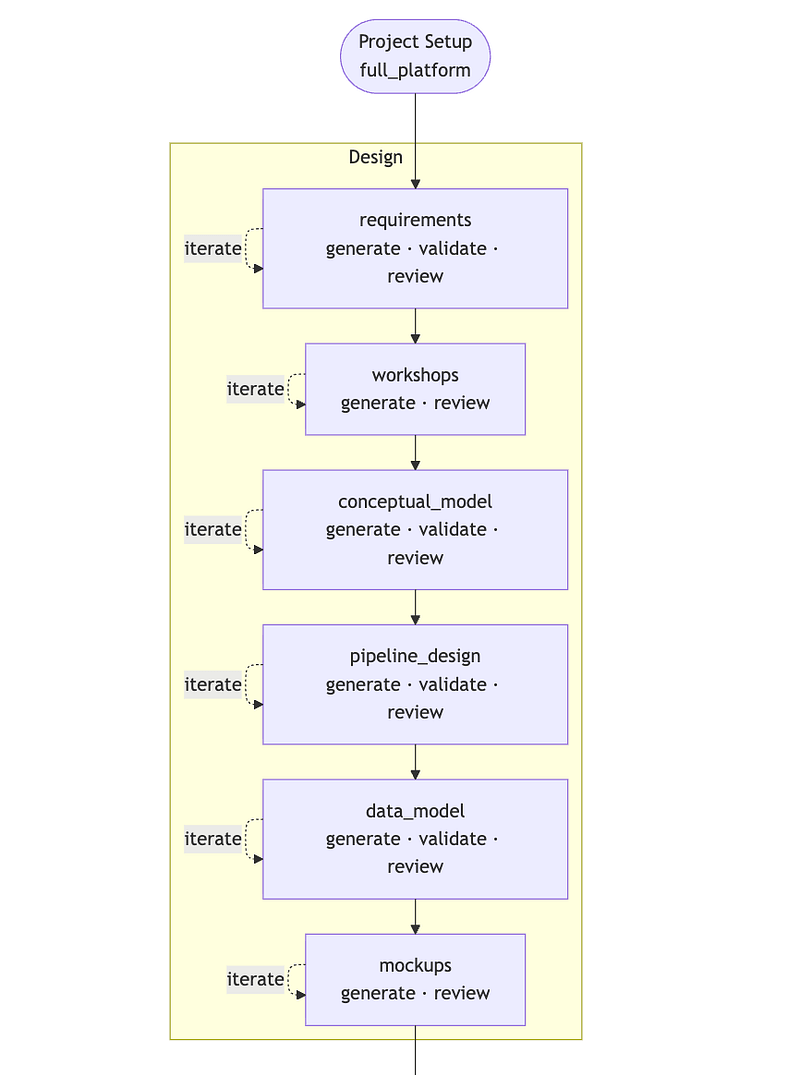
We start by creating a new project (or release, in a larger-overall engagement) by using the /wire:dp:new command (for Gemini Code Assist, we’d use /dp:new)
/wire:dp:new
The framework then asks a series of questions: project type, project name, client name, and SOW path. Selecting full_platform tells the framework to instantiate our full delivery process, activating all 14 artifact workflows across multiple phases (design through to enablement) and writing them into status.md as the project’s process definition.
Because we’re on the main branch of our git repo, it creates a feature branch and switches us to that (handy, as I’m the worst for developing everything in main, just ask my team):
You're on the main branch. A feature branch is required for project work.
→ Switched to branch: feature/20260210_meridian_customer_health
The framework then creates the project structure, and in the background creates a Jira project for me (or lets me map to an existing project and issues (tickets) if they’ve already been created).
.wire/20260210_meridian_customer_health/
├── status.md
├── artifacts/
│   └── Meridian_SOW.pdf
├── requirements/
├── design/
├── dev/
├── test/
├── deploy/
└── enablement/
Now we issue the command to generate the project requirements document.
/wire:dp:requirements:generate 20260210_meridian_customer_health
To do this, Claude Code or Gemini reads the SOW PDF from artifacts/, extracts a set of structured requirements and maps each deliverable in the SoW into the requirements_specification.md artifact, splitting them into functional (below) and non-functional requirements:
## Functional Requirements
**FR-1**: Customer Health Score Dashboard
- Composite health score (0-100) per account combining engagement, payment, and support signals
- Acceptance: Score correlates with known churned accounts at >70% accuracy
**FR-2**: Revenue Analytics
- MRR, ARR, expansion/contraction, net revenue retention by cohort
- Acceptance: Numbers match Stripe dashboard within 1% tolerance
**FR-3**: Product Engagement Metrics
- DAU/WAU/MAU per account, feature adoption rates, workspace utilisation
- Acceptance: Metrics validated against product database event counts
**FR-4**: Support Burden Indicator
- Open case count, average resolution time, escalation rate per account
- Acceptance: Matches Salesforce case report
**FR-5**: At-Risk Account Alerting
- Automated identification of accounts with declining health scores over 30/60/90 day windows
- Acceptance: Customer success team receives weekly digest
After validation (/wire:dp:requirements:validate) confirms completeness across all sections, the review command gathers context before presenting to the stakeholder:
/wire:dp:requirements:review 20260210_meridian_customer_health
Before asking for approval, the framework searches Fathom for recent meetings and Confluence for related documents:
## Meeting Context from Fathom
**Meetings analysed**: 3 meetings from 2026-01-28 to 2026-02-10
### Key Decisions
- Agreed to use Stripe as billing source of truth (not Salesforce Opportunities)
  - Pre-engagement call, 2026-01-28
- Health score weighting: engagement 40%, payment 35%, support 25%
  - Kickoff meeting, 2026-02-08
### Outstanding Concerns
- "We need to make sure the health score accounts for seasonal usage dips
  in Q4" - Sarah Chen, Kickoff meeting, 2026-02-08
### Open Action Items
- [ ] Meridian to provide Stripe API test credentials - Owner: Dev team, Due: 2026-02-14
- [ ] Confirm product database read replica access - Owner: Meridian DevOps
The reviewer sees this context alongside the requirements document, then provides their decision:
→ Reviewer: Sarah Chen, VP Product
→ Status: Approved
→ Note: "Add a note about seasonal adjustment to FR-1 acceptance criteria"
→ Jira: MER-125 (Requirements - Review) transitioned to Done
The conceptual model captures the business entities and their relationships:
/wire:dp:conceptual_model:generate 20260210_meridian_customer_health
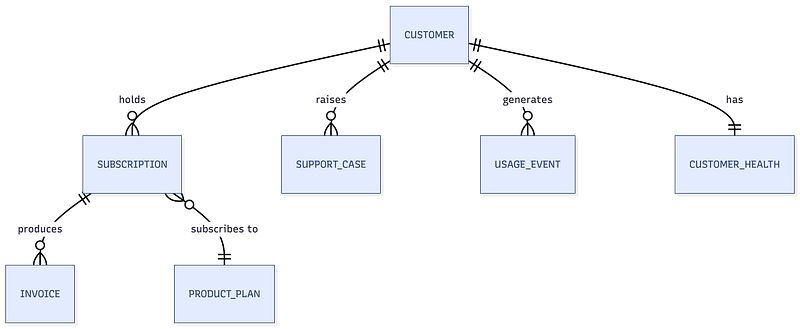
After approval, the data model specification defines every model in the dbt project, such as the customer_health_fct table from the warehouse layer.
### customer_health_fct
**Grain**: One row per customer per month
**Surrogate Key**: `dbt_utils.generate_surrogate_key(['customer_fk', 'health_month'])` → `customer_health_pk`
**Foreign Keys**:
  - customer_fk → customer_dim.customer_pk
**Columns** (ordered: keys → dates → attributes → metrics → metadata):
  - customer_health_pk (PK)
  - customer_fk (FK)
  - health_month_ts
  - engagement_score (0-100, based on DAU/feature adoption)
  - payment_score (0-100, based on payment timeliness/failures)
  - support_score (0-100, inverse of case burden)
  - health_score (weighted composite: 40% engagement + 35% payment + 25% support)
  - health_tier (derived: "Healthy" ≥75, "Monitor" ≥50, "At Risk" ≥25, "Critical" <25)
  - is_declining (boolean: health_score dropped >10 points in 30 days)
  - dbt_updated_at
**Tests**:
  - unique(customer_health_pk)
  - not_null(customer_health_pk)
  - not_null(customer_fk)
  - relationships(customer_fk → customer_dim.customer_pk)
  - accepted_values(health_tier, ["Healthy", "Monitor", "At Risk", "Critical"])
Development Phase
With the data model approved, dbt code generation begins:
/wire:dp:dbt:generate 20260210_meridian_customer_health
The AI reads the full data model specification and generates SQL models, YAML schemas, and source definitions,
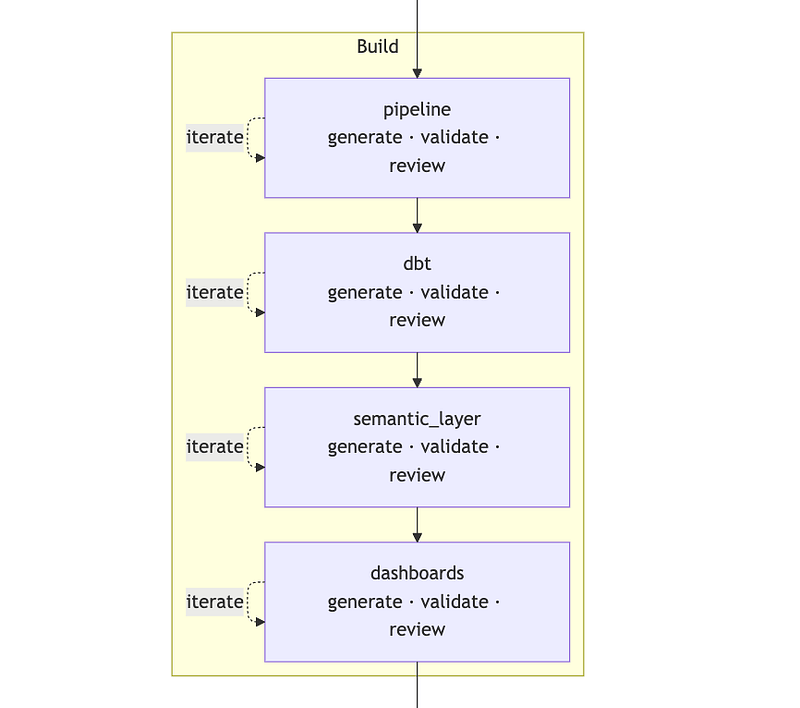
Example outputs in this phase are:
Staging model : models/staging/stripe/stg_stripe__subscription.sql:
{{
    config(
        materialized='view',
        tags=['staging', 'stripe']
    )
}}

with
s_subscriptions as (
    select * from {{ source('stripe_raw', 'subscriptions') }}
    where coalesce(_fivetran_deleted, false) = false
),
renamed as (
    select
        {{ dbt_utils.generate_surrogate_key(['id']) }} as subscription_pk,
        customer as customer_natural_key,
        id as stripe_subscription_id,
        status as subscription_status,
        cast(created as timestamp) as created_ts,
        cast(current_period_start as timestamp) as period_start_ts,
        cast(current_period_end as timestamp) as period_end_ts,
        cast(canceled_at as timestamp) as cancelled_ts,
        items_data_0_plan_amount / 100.0 as mrr_amount,
        items_data_0_plan_interval as billing_interval,
        items_data_0_plan_id as plan_id,
        case
            when status = 'active' then true
            else false
        end as is_active,
        case
            when canceled_at is not null then true
            else false
        end as is_cancelled
    from s_subscriptions
),
final as (
    select * from renamed
)
select * from final
Dimension model : models/warehouse/core/customer_dim.sql:
{{
    config(
        materialized='table',
        tags=['warehouse', 'dimension']
    )
}}

with
s_accounts as (
    select * from {{ ref('stg_salesforce__account') }}
),
s_subscriptions as (
    select * from {{ ref('stg_stripe__subscription') }}
),
s_usage as (
    select
        account_natural_key,
        min(event_ts) as first_usage_ts,
        max(event_ts) as last_usage_ts,
        count(distinct event_date) as total_active_days
    from {{ ref('stg_product__usage_event') }}
    group by 1
),
enriched as (
    select
        s_accounts.account_pk as customer_pk,
        s_accounts.salesforce_account_id as customer_natural_key,
        s_accounts.account_name as customer_name,
        s_accounts.industry,
        s_accounts.employee_count,
        s_accounts.owner_name as account_owner,
        s_subscriptions.subscription_pk as current_subscription_fk,
        s_subscriptions.plan_id as current_plan,
        s_subscriptions.mrr_amount as current_mrr,
        s_subscriptions.is_active as has_active_subscription,
        s_subscriptions.created_ts as subscription_start_ts,
        s_usage.first_usage_ts,
        s_usage.last_usage_ts,
        s_usage.total_active_days,
        s_accounts.created_ts,
        current_timestamp() as dbt_updated_at
    from s_accounts
    left join s_subscriptions
        on s_accounts.stripe_customer_key = s_subscriptions.customer_natural_key
        and s_subscriptions.is_active = true
    left join s_usage
        on s_accounts.salesforce_account_id = s_usage.account_natural_key
),
final as (
    select * from enriched
)
select * from final
Schema definition : excerpt from models/warehouse/core/schema.yml:
version: 2

models:
  - name: customer_health_fct
    description: >
      Monthly customer health scores combining product engagement,
      payment behaviour, and support burden into a composite metric.
      Grain: one row per customer per month.
    columns:
      - name: customer_health_pk
        description: "Surrogate primary key (customer + month)"
        tests:
          - unique
          - not_null

      - name: customer_fk
        description: "Foreign key to customer_dim"
        tests:
          - not_null
          - relationships:
              to: ref('customer_dim')
              field: customer_pk

      - name: health_month_ts
        description: "First day of the health score month"
        tests:
          - not_null

      - name: health_score
        description: "Composite health score (0-100). Weighted: 40% engagement, 35% payment, 25% support."
        tests:
          - dbt_utils.accepted_range:
              min_value: 0
              max_value: 100

      - name: health_tier
        description: "Human-readable health tier derived from health_score"
        tests:
          - accepted_values:
              values: ['Healthy', 'Monitor', 'At Risk', 'Critical']
After generation, the automated validation gate runs:
/wire:dp:dbt:validate 20260210_meridian_customer_health

## dbt Validation Report
**Status**: PASS
**Models**: 12 (5 staging, 2 integration, 5 warehouse)
**Tests**: 47 configured
### Naming Conventions
| Check                         | Status | Count |
|-------------------------------|--------|-------|
| Staging model naming          | ✅      | 5/5   |
| Warehouse fact naming         | ✅      | 3/3   |
| Warehouse dimension naming    | ✅      | 2/2   |
| Primary key naming (_pk)      | ✅      | 12/12 |
| Foreign key naming (_fk)      | ✅      | 8/8   |
| Timestamp naming (_ts)        | ✅      | 15/15 |
| Boolean naming (is_/has_)     | ✅      | 6/6   |
### Test Coverage
| Check                         | Status | Count |
|-------------------------------|--------|-------|
| PK: not_null + unique         | ✅      | 12/12 |
| FK: relationships             | ✅      | 8/8   |
| Custom business rules         | ✅      | 4/4   |
| Total tests configured        | ✅      | 47    |
### SQL Structure
| Check                         | Status |
|-------------------------------|--------|
| Final CTE present             | ✅      |
| Explicit join types           | ✅      |
| No bare SELECT *              | ✅      |
| Source refs in s_ CTEs        | ✅      |
### Recommendations
- INFO: Consider adding freshness checks to Stripe source definitions
The semantic layer translates the dbt models into LookML:
/wire:dp:semantic_layer:generate 20260210_meridian_customer_health
LookML view : views/customer_health_fct.view.lkml:
view: customer_health_fct {
  sql_table_name: `meridian-warehouse.analytics.customer_health_fct` ;;

dimension: customer_health_pk {
    primary_key: yes
    type: string
    sql: ${TABLE}.customer_health_pk ;;
  }
  dimension: customer_fk {
    type: string
    hidden: yes
    sql: ${TABLE}.customer_fk ;;
  }
  dimension_group: health_month {
    type: time
    timeframes: [month, quarter, year]
    sql: ${TABLE}.health_month_ts ;;
  }
  dimension: engagement_score {
    type: number
    sql: ${TABLE}.engagement_score ;;
    value_format_name: decimal_1
  }
  dimension: payment_score {
    type: number
    sql: ${TABLE}.payment_score ;;
    value_format_name: decimal_1
  }
  dimension: support_score {
    type: number
    sql: ${TABLE}.support_score ;;
    value_format_name: decimal_1
  }
  dimension: health_score {
    type: number
    sql: ${TABLE}.health_score ;;
    value_format_name: decimal_1
  }
  dimension: health_tier {
    type: string
    sql: ${TABLE}.health_tier ;;
    html:
      {% if value == "Critical" %}
        <span style="color: #d32f2f; font-weight: bold;">{{ value }}</span>
      {% elsif value == "At Risk" %}
        <span style="color: #f57c00; font-weight: bold;">{{ value }}</span>
      {% elsif value == "Monitor" %}
        <span style="color: #fbc02d;">{{ value }}</span>
      {% else %}
        <span style="color: #388e3c;">{{ value }}</span>
      {% endif %} ;;
  }
  measure: count {
    type: count
    drill_fields: [customer_dim.customer_name, health_score, health_tier]
  }
  measure: average_health_score {
    type: average
    sql: ${health_score} ;;
    value_format_name: decimal_1
  }
  measure: at_risk_count {
    type: count
    filters: [health_tier: "At Risk, Critical"]
  }
  measure: healthy_percentage {
    type: number
    sql: 1.0 * ${at_risk_count} / nullif(${count}, 0) ;;
    value_format_name: percent_1
  }
}
LookML explore — explores/customer_analytics.explore.lkml:
explore: customer_health_fct {
  label: "Customer Health Analytics"
  description: "Customer health scores with account details, subscription, and revenue context"

join: customer_dim {
    relationship: many_to_one
    sql_on: ${customer_health_fct.customer_fk} = ${customer_dim.customer_pk} ;;
  }
  join: subscription_fct {
    relationship: many_to_one
    sql_on: ${customer_dim.current_subscription_fk} = ${subscription_fct.subscription_pk} ;;
  }
}
Testing, Deployment & Enablement Phases
With development complete and validated, the remaining phases test what’s been produced, deploy the dbt and Looker code and set-up the training and enablement for the client team.
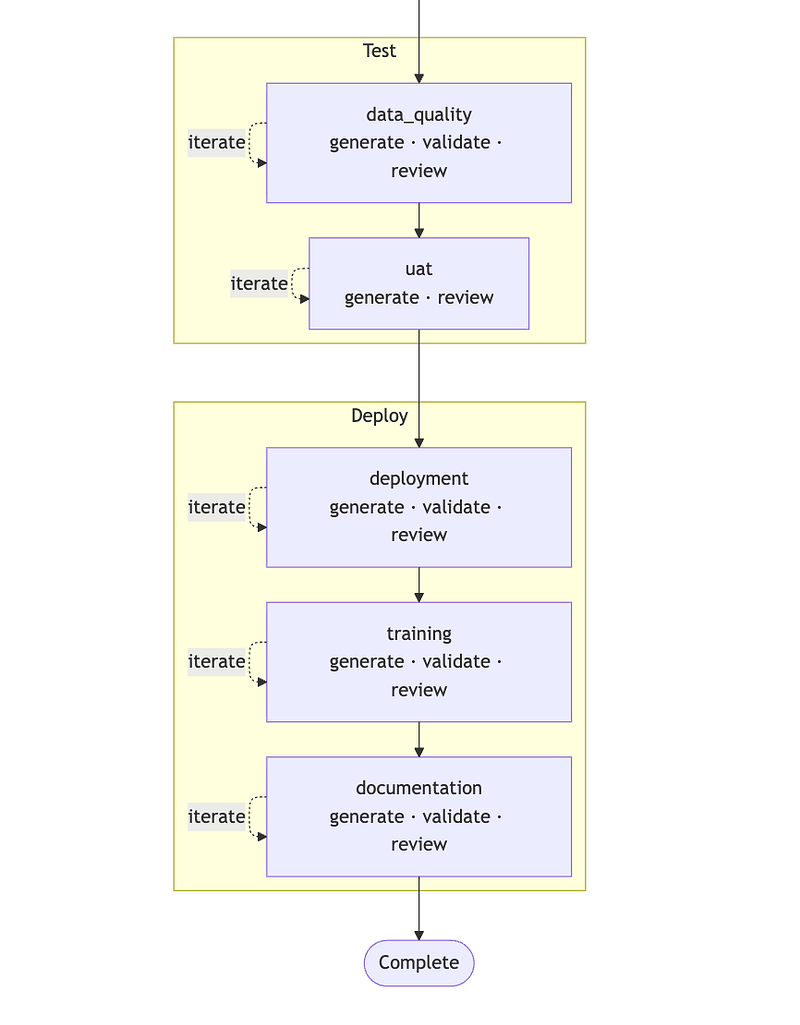
/wire:dp:data_quality:generate 20260210_meridian_customer_health
generates additional data quality tests: source freshness alerts (Stripe webhook latency, Salesforce sync cadence), row count reconciliation between source and staging, and business rule assertions (health scores between 0–100, no orphaned subscriptions).
/wire:dp:deployment:generate 20260210_meridian_customer_health
The framework generates two categories of enablement material — training session plans and technical documentation — tailored to the project’s specific artifacts and audience.
/wire:dp:training:generate 20260210_meridian_customer_health
Final Status
After all artifacts pass their three gates, the project status shows complete:
| Phase           | Artifact         | Generate | Validate | Review | Ready |
|-----------------|------------------|----------|----------|--------|-------|
| Requirements    | requirements     | ✅        | ✅        | ✅      | ✅     |
|                 | workshops        | ✅        | -        | ✅      | ✅     |
| Design          | conceptual_model | ✅        | ✅        | ✅      | ✅     |
|                 | pipeline_design  | ✅        | ✅        | ✅      | ✅     |
|                 | data_model       | ✅        | ✅        | ✅      | ✅     |
|                 | mockups          | ✅        | -        | ✅      | ✅     |
| Development     | pipeline         | ✅        | ✅        | ✅      | ✅     |
|                 | dbt              | ✅        | ✅        | ✅      | ✅     |
|                 | semantic_layer   | ✅        | ✅        | ✅      | ✅     |
|                 | dashboards       | ✅        | ✅        | ✅      | ✅     |
| Testing         | data_quality     | ✅        | ✅        | ✅      | ✅     |
|                 | uat              | ✅        | -        | ✅      | ✅     |
| Deployment      | deployment       | ✅        | ✅        | ✅      | ✅     |
| Enablement      | training         | ✅        | ✅        | ✅      | ✅     |
|                 | documentation    | ✅        | ✅        | ✅      | ✅     |
Engagement summary:
- 12 dbt models generated (5 staging, 2 integration, 5 warehouse)
- 47 automated tests configured
- 5 LookML views, 1 explore, 2 dashboards
- 3 data sources integrated (Salesforce, Stripe, PostgreSQL)
- Full deployment runbook with rollback procedures
- 2 training session plans (data team hands-on workshop + end-user dashboard training)
- Technical documentation with data model reference, health score methodology, and operations runbook
- Complete audit trail in
status.mdwith reviewer sign-offs at every gate, andexecution_log.mddocumenting every command run with timestamps and results - Jira board fully synced: 1 Epic, 15 Tasks, 42 Sub-tasks — all transitioned to Done with enriched comments
Timeline
The Meridian SaaS engagement, from SOW to trained users, completed in about four weeks. The framework generated all artifacts in minutes per phase, and elapsed time was really spent on human review, client feedback cycles and iterative refinement.
A comparable engagement built manually by a senior analytics engineer would typically require 8-12 weeks: 2–4 weeks for requirements and design, 2–4 weeks for dbt development and testing, 2 week for LookML and dashboards, and 1–2 weeks for deployment and enablement.
To be clear, the framework doesn’t eliminate the need for engineering judgement as the consultant still makes design decisions, reviews generated output and handles client feedback. What it does eliminate is the mechanical work: writing boilerplate SQL, configuring tests, creating documentation and maintaining naming consistency across dozens of files.
How is the framework licensed?
When we use the Wire Framework on client engagements, we license it in a way that avoids lock-in after we’ve left. The version used on your project is delivered into your own repository, with full source code, and you receive a perpetual licence to use, modify and extend it for your internal business purposes.
If you choose to bring the work in-house later or engage another partner, you’re free to do so. The framework is designed to sit alongside your dbt project, LookML models and documentation in a transparent and auditable way, not as a black box or hosted dependency.
Interested? Find Out More!
Rittman Analytics is a boutique data analytics consultancy that helps ambitious, digital-native businesses scale-up their approach to data, analytics and generative AI.
We’re authorised delivery partners for Google Cloud along with Oracle, Segment, Cube, Dagster, Preset, dbt Labs and Fivetran and are experts at helping you design an analytics solution that’s right for your organisation’s needs, use-cases and budget and working with you and your data team to successfully implement it.
If you’re looking for some help and assistance with your AI initiative or would just like to talk shop and share ideas and thoughts on what’s going on in your organisation and the wider data analytics world, contact us now to organise a 100%-free, no-obligation call. We’d love to hear from you!