Event-Based Analytics (and BigQuery Export) comes to Google Analytics 4; How Does It Work … and…
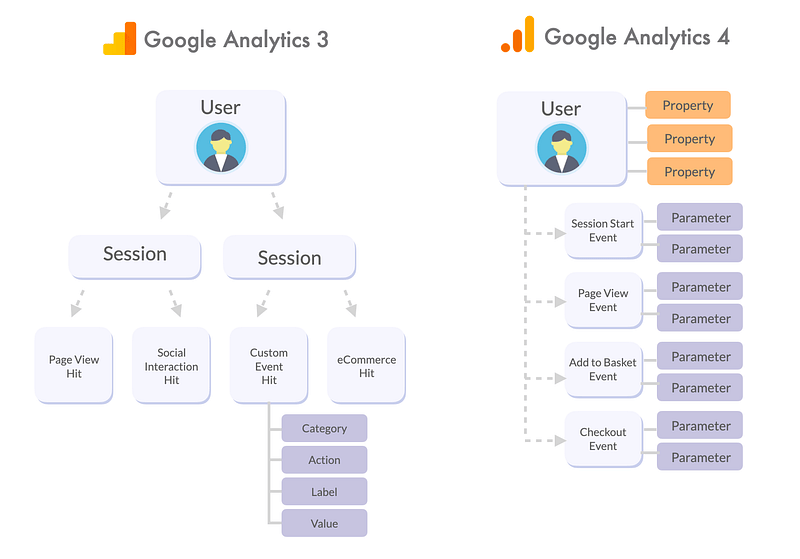
Google Analytics 4, the latest update to Google’s free web analytics service does away with the old Universal Analytics measurement model of users, sessions and hits and instead replaces it with the same type of visitor event-based model used by Segment, Snowplow Analytics and Mixpanel.
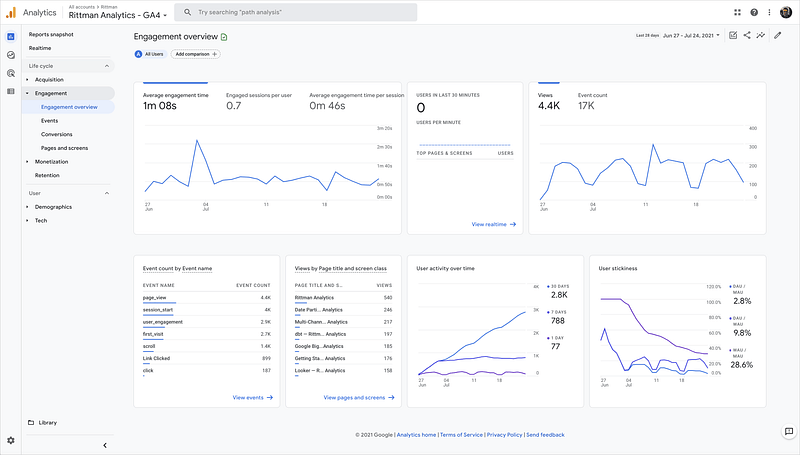
So how does Google Analytics 4 work and why has it changed, how do you query its event data in Google BigQuery and perhaps most importantly … what’s the catch?
I blogged about using Google Analytics (GA) for event-based visitor analytics back in 2018 but in-practice using the Universal Analytics release of GA available back then for this sort of analysis had significant limitations compared to using services such as Mixpanel, Heap Analytics and Segment.
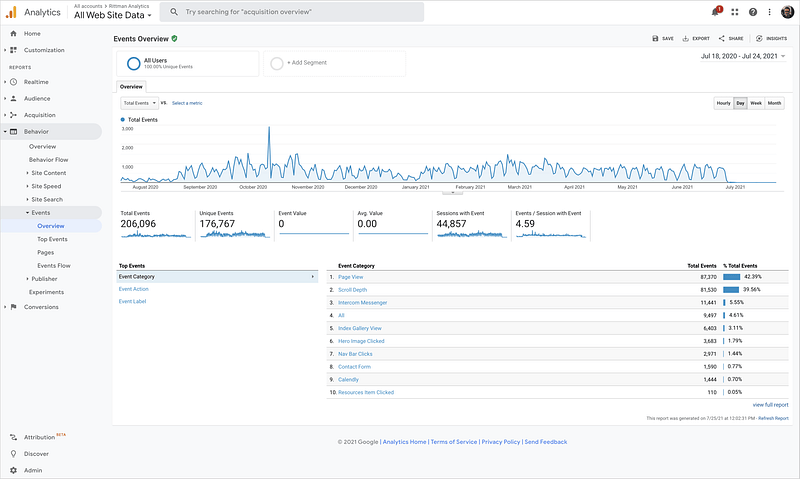
Apart from the usual issues when working with the free version of GA such as visitor data being aggregated to session level, sometimes sampled and only being available via report exports using GA’s API and third-party tools such as Supermetrics and Stitch, custom events in Universal Analytics were always limited by the assumption that they were describing user interactions with objects on a web page or mobile app screen.
Custom events limited to just that narrow scope only need a limited set of object properties for which you need to record a value — its label and categorisation, the action you took such as clicking or pressing it and the value you’d like to assign to a user taking that action, for example the average value of a lead being submitted or a form being completed.
More general customer and product event-collection services such as Segment and Snowplow Analytics are designed to track every type of event across all digital customer touchpoints, as well as offline activities such as in-store purchases that may have been influenced by marketing content a visitors may have seen online.
Google Analytics 3 moved more towards this kind of flexible event and parameters-based model with Unified App and Web Analytics and Google Analytics 4 completed the transition to instead use an event-based measurement approach, but with changes added to increase privacy protection and incorporate techniques such as cookie-less tracking.
Upgrading a Universal Analytics property to GA4 involves setting up a new Google Analytics property for your site, so we did just that and created a new set of events to mirror our existing GA3 and Segment events using Google Analytics web interface and Google Tag Manager.
Similar to how Heap Analytics automatically tracks events without needing to write Javascript code, GA4’s optional Enhanced Measurement feature can auto-capture a number of common user events such as page views, link clicks, scroll events and form submissions without you having to add server-side or Javascript tracking event code to your website.
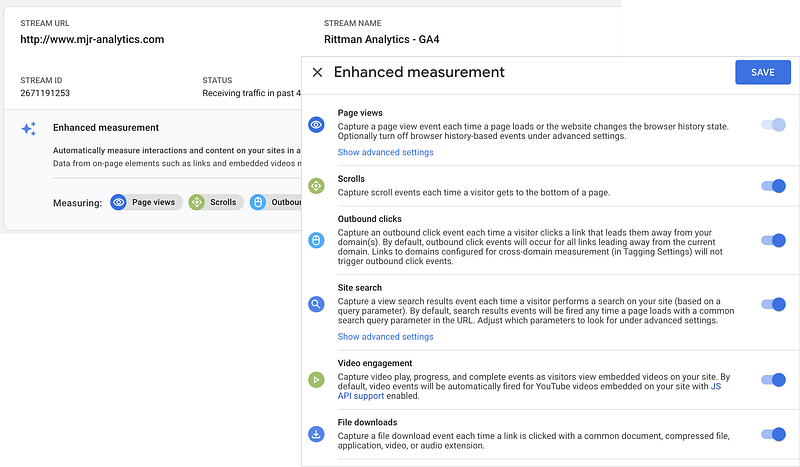
Again similar to Heap Analytics you can then create additional derived events directly within Google Analytics from these base event types, for example defining a conversion event as a page view for the final page in your checkout process.
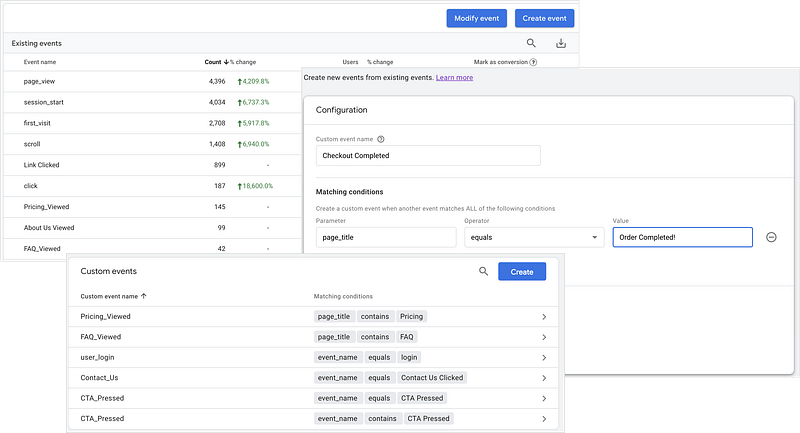
For requirements beyond what’s possible within Google Analytics itself you can feed offline and server-to-server events directly into GA4 via HTTP requests using an updated version of the Google Analyics Measurement Protocol, for example in the example below to send an event to record an offline meeting being booked.
{
   "client_id":"2",
   "user_id":"604356a0cd37ed00041ce1ab",
   "timestamp_micros":"1627226029669000",
   "non_personalized_ads":true,
   "user_properties":{
      "email":{
         "value":"mark@rittmananalytics.com"
      }
   },
   "events":[
      {
         "name":"meeting_booked",
         "params":{
            "meeting_title":"test meeting",
            "meeting_timestamp":1627226029669000
         }
      }
   ]
}
Or you could use Google Tag Manager to define any type of user event you wish as pairs of triggers and Google Analytics 4 Event tags, with the payload from those event tags then being sent on to Facebook Ads, Google Ads and other downstream marketing services, similar to Segment’s Connections service.
From my perspective as an analytics engineer who uses Google BigQuery just about every day but could never afford to cost of a Google Analytics 360 license, the fact that Google Analytics 4 now also comes with real-time export of event data to BigQuery for free, without having to pay the $150k/year that Google charge for GA360 is just simply, amazing.
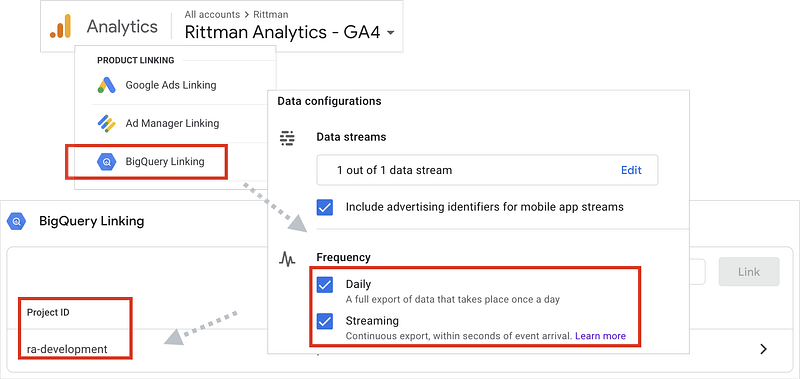
Export is limited to just one BigQuery dataset and there’s no option to export into Snowflake or Redshift but even so, this is a game changer and brings event-based visitor analytics within the reach of just about any website owner.
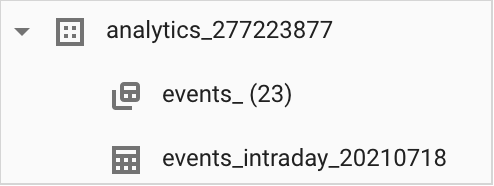
Once you’ve configured Google Analytics 4 to export events to your Google Cloud Platform project, you’ll see a dataset created with your GA4 property ID as the dataset name’s suffix, and two tables, one for your daily exports that’s ingestion date-partitioned and another for real-time event exports that gets dropped and recreated at the end of each day.
If you’re familiar with the nested, repeated columns found in Google Analytics 360’s export schema you’ll initially feel familar with how Google Analytics 4 stores page views, sessions and other types of events within a single table, aligning the storage of your event data with the ideal requirements of Google’s global storage system, Colossus.
But GA4’s export schema isn’t quite the same as the one used by GA360; instead of each row storing an individual user’s session with all of the page view, ecommerce and other hits nested as repeating sets of columns within those session rows, GA4’s export schema stores each user event as a separate table row and the parameters for those events stored as sets of repeating, key/value column pairs.
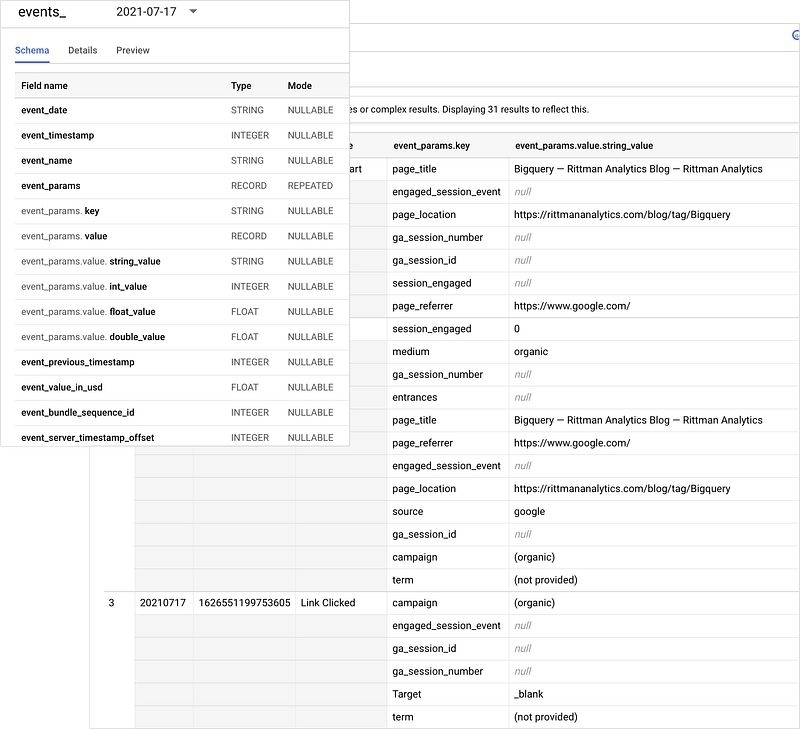
Querying this table schema to return a list of pages viewed along with the page paths and referrers for those events requires you filter on “page_view” as the event type and then obtain the page title, page path and referrer using BigQuery Standard SQL’s UNNEST command, like this:
SELECT
  event_timestamp,
  (SELECT
    value.string_value
  FROM
    UNNEST(event_params)
  WHERE
    event_name = 'page_view'
    AND key = 'page_location') AS page_path,
  (
  SELECT
    value.string_value
  FROM
    UNNEST(event_params)
  WHERE
    event_name = 'page_view'
    AND key = 'page_title') AS page_title,
  (
  SELECT
    value.string_value
  FROM
    UNNEST(event_params)
  WHERE
    event_name = 'page_view'
    AND key = 'page_referrer') AS referrer,
  user_pseudo_id,
  user_id
FROM
  `ra-development.analytics_277223877.events_*` -- modify to your project
WHERE
  event_name = 'page_view'
ORDER BY
  event_timestamp
and returns a set of rows, one per page view event, like this:

Rather than having to sessionize each visitor’s events yourself as you do with Segment, events in GA4 are already assigned a session ID that maps to a “session_start” event type containing event parameters for the source of the visitor event, details of the browser technology and the geo location of the visitor’s device as shown in the next query example.
SELECT
    user_pseudo_id,
    TIMESTAMP_MICROS(event_timestamp) AS session_start_ts,
    CAST(LEAD(TIMESTAMP_MICROS(event_timestamp),1) OVER (PARTITION BY CONCAT(user_pseudo_id)
      ORDER BY
        event_timestamp) AS timestamp) AS session_end_ts,
    (SELECT value.int_value FROM UNNEST(event_params) WHERE key = 'ga_session_id') AS session_id,
    (SELECT value.int_value FROM UNNEST(event_params) WHERE key = 'ga_session_number') AS session_number,
    (SELECT value.string_value FROM UNNEST(event_params) WHERE key = 'page_referrer') AS referrer,
    (SELECT value.string_value FROM UNNEST(event_params) WHERE key = 'page_location') AS landing_page_path,
    (SELECT value.string_value FROM UNNEST(event_params) WHERE event_name = 'page_view' AND key = 'page_title') AS landing_page_title,
    traffic_source.name,
    traffic_source.medium,
    traffic_source.source,
    CASE
    WHEN device.category = "desktop" THEN "desktop"
    WHEN device.category = "tablet" AND app_info.id IS NULL THEN "tablet-web"
    WHEN device.category = "mobile" AND app_info.id IS NULL THEN "mobile-web"
    WHEN device.category = "tablet" AND app_info.id IS NOT NULL THEN "tablet-app"
    WHEN device.category = "mobile" AND app_info.id IS NOT NULL THEN "mobile-app"
    END AS device,
    device.mobile_brand_name,
    device.mobile_model_name,
    device.mobile_marketing_name,
    device.mobile_os_hardware_model,
    device.operating_system,
    device.operating_system_version,
    device.vendor_id,
    device.advertising_id,
    device.language,
    device.is_limited_ad_tracking,
    device.time_zone_offset_seconds,
    device.browser,
    device.browser_version,
    device.web_info.browser,
    device.web_info.browser_version,
    device.web_info.hostname
  FROM
    `ra-development.analytics_277223877.events_*` s -- modify to your project
  WHERE
    event_name = 'session_start'
    order by 1,2
The full range of BigQuery Standard SQL functions and syntax is available for use when querying the GA4 export schema, with the example below using CTEs (common table expressions) and the new PIVOT function in Standard SQL to count the various event type occurences in each visitor session.
WITH events as (SELECT
    user_pseudo_id,
    (SELECT value.int_value FROM UNNEST(event_params) WHERE key = 'ga_session_id') AS session_id,
    (SELECT value.int_value FROM UNNEST(event_params) WHERE key = 'ga_session_number') AS session_number,
    replace(lower(event_name),' ','_') event_name,
    count(*) events
  FROM `ra-development.analytics_277223877.events_*`
  GROUP BY
    1, 2, 3, 4),
session_events_pivoted as (
SELECT * FROM
    (SELECT * FROM events)
    PIVOT (SUM(events) for event_name IN('session_start', 'page_view', 'podcast_played', 'pricing_viewed', 'view_case_studies', 'file_download', 'contact_us', 'contact_us_clicked','cta_pressed','about_us_viewed'))
ORDER BY
 1,2),
session_event_counts as (
select
  * except (session_number),
  case when page_view = 1 then true else false end as is_bounced_session,
  case when session_number > 1 then true else false end as is_returning_user,
  case when contact_us > 0 or contact_us_clicked > 0 or cta_pressed > 0 then true else false end as is_converting_session
from
  session_events_pivoted)
select * from session_event_counts
Like Segment’s ability to stitch together the authenticated and unauthenticated browsing sessions for an individual visitor, GA4’s equivalent user_id and pseudo_user_id user properties can be stitched together to provide a user’s complete conversion journey from first visit to checkout and register.
SELECT
  DISTINCT user_pseudo_id as user_pseudo_id,
  LAST_VALUE(user_id ignore nulls) OVER (
    PARTITION BY user_pseudo_id
    ORDER BY event_timestamp
    ROWS BETWEEN UNBOUNDED PRECEDING AND UNBOUNDED FOLLOWING
        ) AS user_id,
    MIN(event_timestamp) OVER (
            PARTITION BY user_pseudo_id
        ) AS first_seen_at,
    MAX(event_timestamp) OVER (
            PARTITION BY user_pseudo_id
        ) AS last_seen_at
FROM
    `ra-development.analytics_277223877.events_*` -- modify to your project
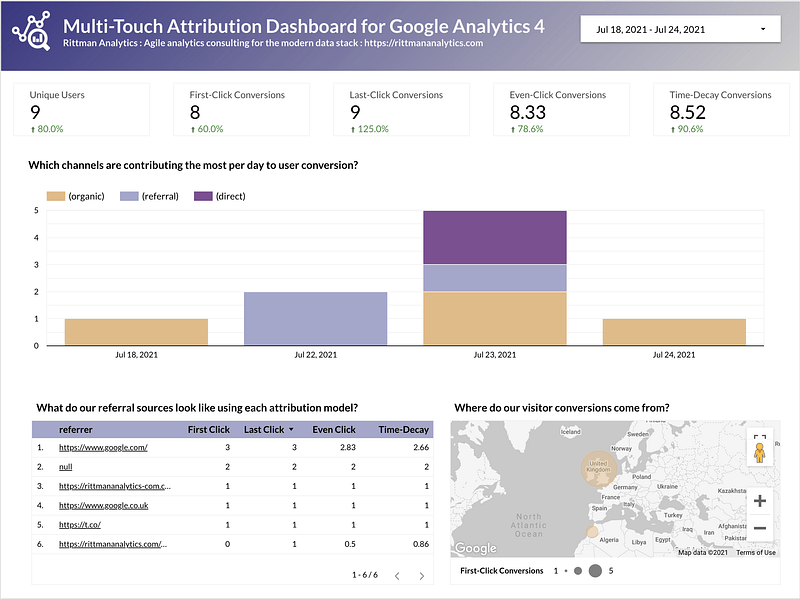
And now that we can stitch complete individual conversion journeys together it doesn’t take much more to create Data Studio dashboards like the one below together, powered by a multi-touch attribution model written using just a single BigQuery Standard SQL query.
Example BigQuery Standard SQL queries for these and other common use-cases can be found on our Github Gists site with individual links below:
- GA4 page views, page paths and referrers
- GA4 sessions
- GA4 event name and parameter combinations
- GA4 session event counts and other metrics
- GA4 visitor page view journey
- GA4 multi-touch attribution model
So what’s the catch? Like any service with a significant change to how it works internally you can expect there to be limitations, issues and bugs you’ll need to work around while the service settles down; GA is no different here and the industry consensus is to tread warily and not switch off your Universal Analytics properties just yet.
A more fundamental, and from Google’s perspective deliberate difference between GA4 and services such as Segment and Snowplow is the focus on user privacy and the inevitable disappearance of third-party cookies as a means of tracking user activity.
What this means for GA4 is the introduction of cookie-less tracking and the use of machine learning to fill-in gaps in user data but how exactly this works and how reliable is the data it produces are yet to really be understood.
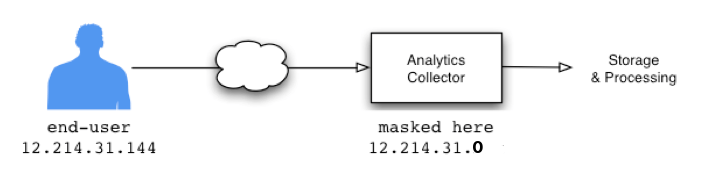
IP addresses anonymization is enabled by default and cannot be disabled, making plugins and filters such as Snowplow Analytics’ IP Lookup Enrichment plugin impossible with GA4, although the latter does in-fact automatically geo-code events for you without the need for a plug-in.
And finally of course — when a service is free there’s not much you can do if the provider of that service wants to close your account for political or other reasons, something a service provider such as Google with lots of government contracts might be under more pressure to do than a lower-profile supplier such as Segment or Snowplow.
Sometimes paying for a service and owning your own data makes more sense than getting things for free but having no redress if things go wrong, and personally I’d be wary of ditching a paid service such as Segment with rock-solid infrastructure and a clear set of vendor incentives to keep providing you with a great service, but bearing this all in-mind and certainly as an upgrade from Google Analytics 3, this is an amazing upgrade to what was already a very popular and capable service.
Interested? Find out More
If the idea of analyzing your website traffic interactions at individual visitor level, mapping your customer journey and doing it all for free using Google Analytics sounds interesting to you, or you’re looking for some help and assistance building-out your new customer data analytics platform on a modern, flexible and modular data stack, contact us now to organize a 100%-free, no-obligation call — we’d love to hear from you!